In a month or so my iPad trial will start in school.
I am creating video tutorials for staff to go alongside my more formal training.
This video is a very brief look at the iPad settings and only covers some very basics.
In a month or so my iPad trial will start in school.
I am creating video tutorials for staff to go alongside my more formal training.
This video is a very brief look at the iPad settings and only covers some very basics.

{UPDATED}
I have been working very hard over the last few months producing my new Computing curriculum and it is finally ready.
Details below:
Feel free to download and use this curriculum. If you use this booklet, its projects or ideas and would like to make a donation for its continuing development, please use the link provided. I would like to keep giving this document away for free so any donation would be amazing. Please click to be redirected to my donation page.
This is now version 2 – DOWNLOAD HERE
V2
I have added / amended the following:
End products have changed for the following projects:
In Development
If you would like some help with creating your own resources or would like me to produce any educational publications, please visit www.realiselearning.co.uk.
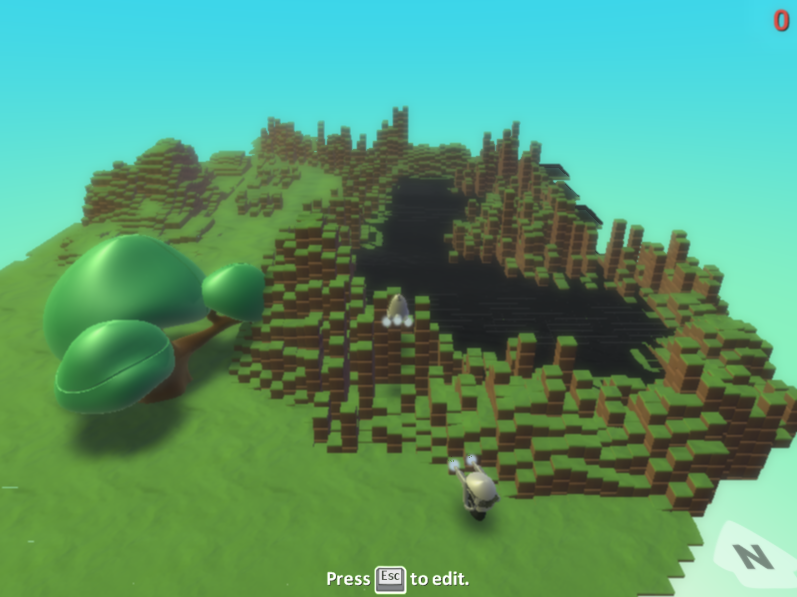
This projects is an introduction to programming fundamentals using MS Kodu. Students learn how to create their own video games and get some idea how they are produced in the industry.
Project: Visual Programming: Kodu

This is the 1st online safety unit students have in ICT.
In this project student will use www.thinkuknow.co.uk to learn about staying safe online and then produce an interactive kiosk style publication for other students.
Project: Staying Safe Online

(To use Google Docs you must be 13 or over. This project is only suitable for schools using Google Apps for Education. If you would like to use this project you could run it in Year 9/3rd Year)
Last year I did an assembly on DropBox and Google Docs and realised how little the upper school new about the Cloud. I decided that I need to create a project on the cloud and specifically office documents.
While this project focuses more on Google Docs I will cover other cloud services. Especially services that allow students to easily back up their school work.
Project: Office Documents and the Cloud

In September I intend to start a learning blog with my 1st years/year 7’s. If it is successful I intend to roll it our to all year groups.
Essentially I want students to have there own blog. Each week they will post an update. This update will be about what they have done that week, what they have learnt, an evaluation and any work they would like to post. They can also share their blog with their peers and get them to comments on their posts.
They would carry on doing this in ICT (or other subjects if they would like to get involved) throughout the lower school and upper school if they choose. Obviously technology will change over their time at school. Although, we can cross that bridge when we get to it and up date the learning blog when we need to.
Project: Learning Blog

This project builds on a the 1st Kodu project (year 7/1st year) which will be posted soon. In the first project, students find their feet with Kodu. In this project they have to decide a genre for their game and fully plan it.
Project: Visual Programming: Kodu Project

I have seen magazine cover creation being taught in the past. What I often find is that what is produced look like posters, rather than magazines.
During this project we take a look at what magazine actually look like. Then students take the design features and elements we like to produce a cover of their own using what I have taught in lessons.
In the presentation below there is a link to example student work to give you an idea about what I expect. There is also a link to video tutorials. They will be added soon.
(Work in Progress)
Project: Graphic Design: Magazine Covers

Like in the 3rd year/year 9 students have about 18 lessons a year.
The aim of the first Year8/2nd year project of the year is to teach students about the inside of a computer, input/output devices and a little about the history of british computing.
Many students know very little about the history of modern computing or the basics of the inside of computers. I hope to address that with this project.
(Work in Progress)
Project: Computer Hardware/Computing History

The final project in the 3rd year/year 9 is a programming unit.
Students will use www.codecademy.com to learn how to program with Python. I really like codecademy and think it is a great way for student to learn. The digital badges and the ability to share progress online is great.
Thank to Dan Aldred for the use of his Python Workbook
(Work in Progress)
Project: Programming: Python


 mattbritland.com