Education

Animoby – The iPad White Board App (Videos Included)

If you are looking for an alternative to Explain Everything you should check out Animoby.

Its free on the Apple App Store as well as Google Play. It has some great features and what I like the most is the UI, it is very user friendly.

Create quality presentations using VOICE and a variety of design tools (draw, paint, type, image), and publish or share via e-mail. Animations are created when users pick a tool and simply touch the screen, and voice can accompany designs by the press of the record button. Unlike other apps that create presentions, Animoby’s sharing process is simplified due to compact file sizes it uses.

I have also been impressed with the some of the editing options for things like images. All in all a great app and well worth downloading.


Zurich’s Future, History, Now – The Classroom of 2018

Future History Now is a series of films, articles and events designed to stimulate a positive way of thinking about and planning for our futures against the backdrop of major demographic, technological, workplace and social change.

Welcome to 2018! (From the Future, History, Now website)

I gave a talk at the first event on the 28th November in Central London on the classroom of 2018. It was a great evening that included some awesome talks.

Hopefully, there will be a video available soon.

Developing An Effective E-Safety Policy (Presentation Included)

This is one of the presentations I gave at the ‘How to Deliver an Effective Computing Curriculum’ day by Government Knowledge on 12th November.

Special thanks to Alan MacKenzie (@esafetyadviser). For more information head over to his website: www.esafety-adviser.com

Effective Use Of Tablets In The Classroom (Presentation Included)

This is one of the presentations I gave at the ‘How to Deliver an Effective Computing Curriculum’ day by Government Knowledge on 12th November.

Do teachers need to be qualified? Don’t ask such silly questions

This article was originally published by The Guardian on 28th October 2013 and was a response to Anthony Seldon’s Guardian article.

Surely it goes without saying that teachers should be qualified? Apparently not.

The idea of unqualified teachers working in school is nothing new and Gove has made it clear for sometime that he feels experts in their field should be able to work in free schools and academies. It would appear that all it takes to be a teacher is subject knowledge and a passion for the subject. Can you imagine how easy teaching would be if this was true.

Our job is far more than that, which is why gaining a teaching qualification is so important. When I think back to my training year, I can see that it was the hardest 12 months of my life, closely followed by my NQT year.

I was eager to be a teacher but wouldn’t have lasted five minutes without the sort of formal training I received not only from my school but from university. Teaching is hard, students can be challenging, the job can affect you in ways you never expected. Working towards a qualification prepares you for this.

I trained alongside some incredible people at university; people that ran their own tech companies, computer programmers, some trainees with first-class degrees – people who, on paper, would be far better teachers than me. I can imagine these people would be exactly the sort that Gove would love to see in schools. The problem is, many of them did not cope well. They found it hard to deal with behaviour and students’ social problems. They struggled to communicate their vast knowledge to students. Lots of people drop out. If they had been employed by a school straight away rather than starting a PGCE they would have quit, leaving students without a teacher.

Is it not fair on the unqualified teacher, their colleagues or students to employ them without having proof that they can meet a national minimum standard. We should not be experimenting with this.

If a school sees potential in someone and wants to employ them as an unqualified teacher, then great. But that school should be willing to train this member of staff up and get them qualified. If they are not willing to train them up, I think questions need to be asked.

Could employing unqualified teachers be about saving money? They are certainly cheaper. Will unqualified teachers be less likely to be unionised? Is this an advantage for schools?

Finally, how would students and parents feel about this? If you want a carer for your child you want one with qualifications. It’s important, it gives parents confidence that carer can do the job. Social workers need to be qualified. And, teachers are social workers too, of sorts. It does not matter if you are in a free school, academy or independent school you will have to deal with pastoral problems of different kinds.

I absolutely understand that those without a teaching qualification have much to offer. My advice is to do your training, get a qualification and join a union. Teaching is so much more than standing in front of a class and knowing stuff. I wonder if Gove has heard of pedagogy. Knowing something doesn’t mean you can teach it. Teachers should be qualified.

(Digital) Information Literacy – Top 10 Tips for Parents and Teachers

  1. Explain that not everything on the internet is true

  2. Ask your child/student to compare information from different sites when doing research. Some sites may be biased or have a political agenda

  3. Trustworthy sites may be associated with trustworthy organisations

  4. Question what you read and look for other opinions

  5. Use keywords when searching the web to make your search more accurate. Do not just type a question – select the most important words

  6. When searching for websites and images etc try refining the search using the search tools so you are more likely to find what you want. These options are just underneath the Google search bar

  7. Encourage your child/student to read the whole article or page

  8. Information should not just be copied and pasted. It needs to be read, understood, digested and questioned

  9. Encourage your child/student to use well known sources. For example: NASA, BBC etc.

  10. Avoid using sites such as answers.yahoo.com. Anyone can contribute to these sites and the information may not be correct or accurate. If you are using Wikipedia, make sure you look out for mistakes or things that may not be true.

(UPDATED) Swivl: A Device For The Flipped Classroom

I recently purchased a device called ‘Swivl’ for school and I thought I would take the time to write a quick post about it.

‘Swivl’ is a used to film lessons or other activities for use with the flipped classroom or lesson observations.

The device sits on a tripod and has a slot for you to put your iPhone or iPod Touch into it. You can then put the microphone/sensor around your neck and the device will swivel round and follow you as you walk around the classroom. It pretty cool and staff and students were impressed with the tech.

It is a great device that is very useful if you want to film your lessons, especially if you have a teacher that walks around a lot, like me. It also has a free App that that optimises the experience.

As you will see from the video below, you should check the white balance as you can hardly see what is on the whiteboard. I should have really had a look before I started filming, leaving the classroom light on would have helped. It is also fairly pricey at about £175. I got mine from: http://www.techinvasion.co.uk/

There is another issue too. If you are walking around the camera follows you, which is fine. However, I make lots of small movements so the camera can be a little jerky. Probably something just to be mindful of when you are using it I suppose. Update: A representative of Techinvasion read this post and kindly emailed me with some guidance. He let me know that there is a ‘Sport Mode’ which is there for just this reason. 

Overall, I think it is really good. It is very easy to set up and will certainly improve the filming and sharing the lessons.

Have a look at the video and make up your own mind. Sorry about the rubbish commentary. It has been a long day. 🙂

MOOCs – Cambridge GCSE Computing: Free Online Computing Course

The Cambridge GCSE Computing MOOC is well worth visiting, whether you are a teacher or student.

It is completely free and includes hundreds of videos, resources and quizzes.

If you are a teacher looking for some CPD, look no further. This could really help your personal development.

Students will love this too. It is aimed at 14-16 year olds but I have a 12 year old working through this in his spare time. You may not get a GCSE out of it, but you do get a certificate of participation.

It is clear that a lot of time has been spent creating this. I really appreciate those involved in this project, I am sure it will be a great success.

This is work in progress and they are adding more lessons throughout this year and next year.

Give it ago, you may just love it.

Sign up for it here:

http://cambridgegcsecomputing.org/

Here is an example of a couple of videos:


Edmodo: How students submit work (Video)

I have made this video tutorial for 6th form students to show them how they can submit their PDP project electronically using Edmodo. It may be of use to anyone thinking about using Edmodo in their school.

In the past this project has been carried out on paper, but this year we decided to make it completely digital.

Once I have created the training video for how teachers will annotate and grade this work, I will post it.


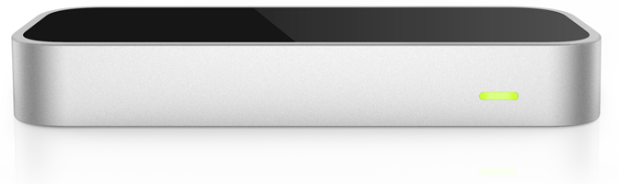
Quick Look at Leap Motion (Motion Controller): Pt 1

I got hold of Leap Motion today and I was keen to try it out. The possibility of augmenting what is happening on the computer screen by the motion of my hands it exciting.

At lunchtime today, I set it up with some students and we gave it a go. They really liked it and I was quite impressed. All was going well until I tried to load the Leap Motion console and app store which meant connecting over the internet. The big problem was…

It does not work over a proxy. This meant of course, I can not use it at school at the moment.

According to the forums I have read, they are addressing this problem.

I have taken it home now and in the next video I will demonstrate using some of the apps that you can use.